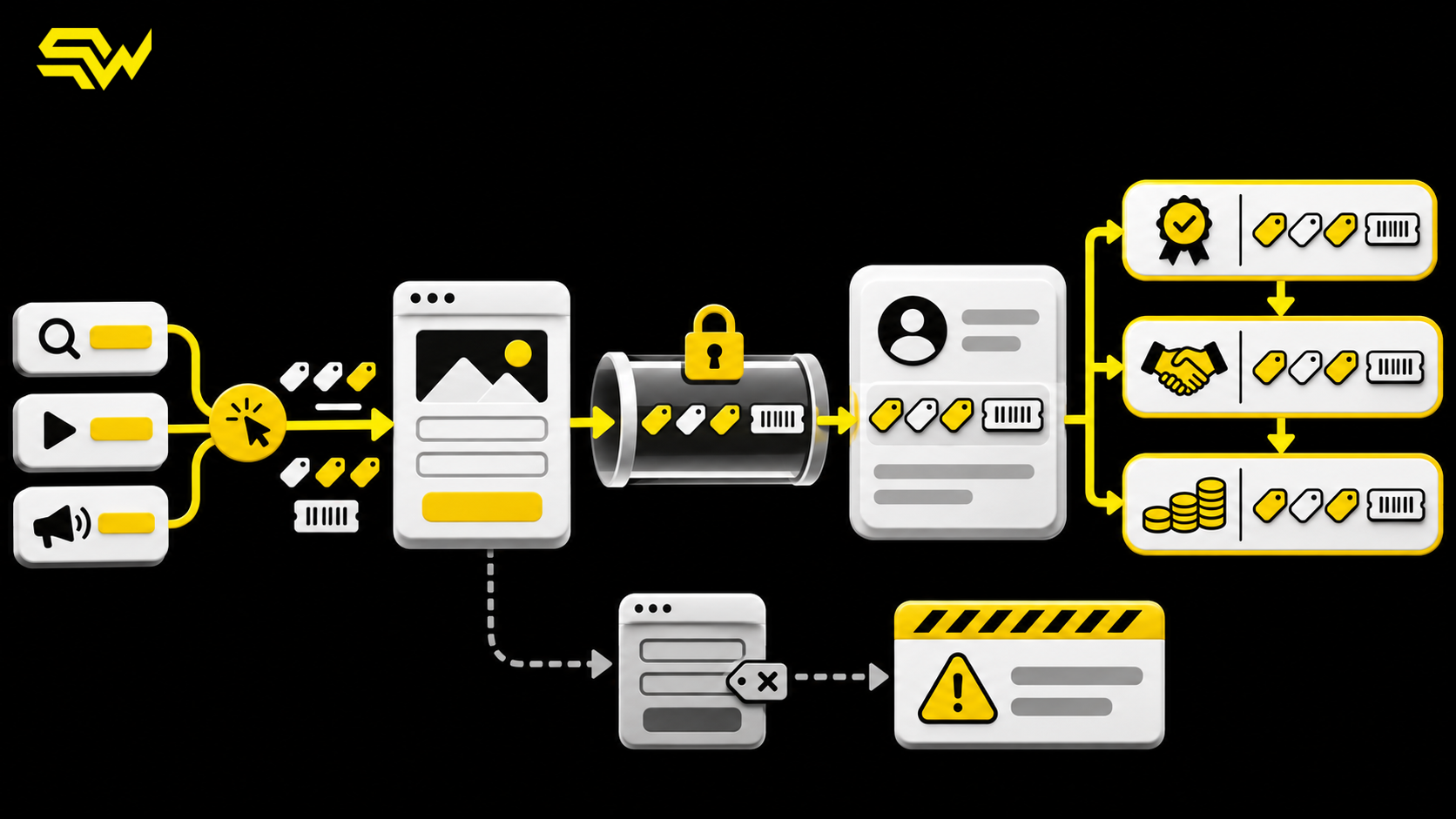
Paid media can generate a real sales opportunity while the CRM still reports its source as “direct,” “unknown,” or simply the channel attached to the lead’s most recent visit. That gap usually begins before the sales team ever sees the record: campaign parameters disappear during a redirect, a form fails to carry a click ID, or an automation overwrites the original source.
A CRM source attribution audit traces the identifiers from the first landing page through form submission, contact creation, qualification and revenue. The goal is not to force every sale into a perfect single-touch story. It is to preserve enough reliable evidence to answer practical questions: Which campaigns create qualified leads? Where does attribution break? Which data is safe to use for bidding or budget decisions?
Start with a field map, not another dashboard
Before changing tags or reports, document the fields that should survive the journey. A useful minimum is:
- original source, medium and campaign;
- latest source, medium and campaign;
- campaign and creative IDs where available;
- click identifiers such as GCLID;
- first landing page and initial referrer;
- first-touch and latest-touch timestamps; and
- the CRM record ID, lifecycle stage and qualified or revenue outcome.
Google Analytics recognizes manual campaign parameters including utm_source, utm_medium, utm_campaign, utm_id, utm_term and utm_content. Google also recommends consistent, case-sensitive naming because values such as Meta and meta become separate rows. That makes a documented UTM tracking convention a data-quality control, not just a naming preference. See Google’s current guidance on manual campaign tagging and campaign URL parameters.
This article’s keyword priorities are qualitative rather than based on unverified search-volume estimates. “CRM attribution audit” and “lead source tracking” express a service need; “UTM tracking setup” and “how to preserve GCLID in a CRM” capture narrower implementation intent.
Preserve original and latest source separately
One field cannot represent both acquisition and the latest interaction. If a prospect first arrives through a paid search campaign, returns through an email and then submits after typing the URL, overwriting the source with each visit erases the acquisition trail. Never updating the source, however, hides the interaction that finally preceded the form.
The practical solution is two sets of fields. Populate the original-source fields once, when the first eligible value is known. Update latest-source fields on each qualified marketing visit. HubSpot uses this same distinction: its Original Traffic Source represents the first known web source, while Latest Traffic Source represents the most recent known source. Its documentation was updated August 4, 2026 and also describes drill-down fields for more specific context. Review HubSpot’s source-property definitions even if you use a different CRM; the underlying field-design principle is broadly useful.
The limitation is important: “first known” is not necessarily the person’s first exposure to the business. Cookie deletion, consent choices, cross-device behavior, forwarded links and offline interactions can all create an earlier touch that your system cannot observe.
Capture click IDs before redirects or forms can lose them
For Google Ads, auto-tagging adds a GCLID to the landing-page URL. Google describes the GCLID as the parameter that identifies the campaign and other attributes of an ad click, and its current Analytics guidance recommends auto-tagging for the most detailed Google Ads data. Read Google’s explanations of auto-tagging and final URLs and the GCLID.
Audit the full route, not only the first page load:
- Click a tagged test URL for each paid channel.
- Confirm the landing page receives the expected UTMs and click ID.
- Follow every redirect, cross-domain step and form embed.
- Submit the form and inspect the raw payload.
- Confirm the CRM contact retains the same values after deduplication, enrichment and assignment automations run.
Hidden form fields can carry attribution values, but they should be paired with first-party storage and server-side validation. A browser extension, privacy setting or script failure may prevent a field from populating. Treat missing data as a measurable exception, not a reason to invent a source.
If your team already imports qualified outcomes to ad platforms, compare this audit with our guide to Google Ads offline conversion tracking for qualified leads. Google’s November 2026 guidance for enhanced conversions for leads recommends continuing to send GCLIDs where possible and describes user-provided data, consent, transaction IDs and qualified-lead goals. These features can strengthen measurement, but only when your collection and use of customer data comply with applicable policies and consent requirements.
Stop CRM automations from rewriting the evidence
Source loss often happens after the form succeeds. Common causes include a contact-enrichment tool replacing the original source, a CRM-to-email sync writing blank values back to the CRM, or a record merge keeping the newer contact’s acquisition fields.
Define one system of record and field-level write rules. Original-source fields should normally be write-once, with changes limited to controlled backfills. Latest-source fields may update, but only from approved events. Store the raw captured values as well as normalized reporting values so an audit can distinguish what arrived from what a rule later classified.
Also assign a durable lead or transaction ID. That ID lets marketing and sales reconcile duplicates without relying on email alone. It complements the workflow in our CRM lead follow-up automation guide: fast routing matters, but the record also needs trustworthy acquisition context when it reaches the owner.
Connect attribution to qualified outcomes
A lead-source report becomes more useful when it joins campaign evidence to business stages. Map the CRM states that matter—such as qualified lead, sales-accepted opportunity and closed revenue—and record who or what changed each stage.
Then reconcile counts at three checkpoints each week:
- tagged landing sessions versus form submissions;
- form submissions versus CRM records; and
- CRM records versus qualified and revenue outcomes.
Do not expect the totals to match perfectly. Consent, cross-device journeys, duplicate contacts, phone calls and platform modeling create legitimate differences. The audit should explain material gaps and establish an acceptable tolerance rather than promise perfect attribution. For a broader measurement foundation, use our GA4 and Search Console lead-tracking checklist.
A practical 30-day attribution audit
During week one, freeze the field dictionary and UTM naming standard. In week two, test the five highest-spend campaign-to-form paths and record every value at each handoff. In week three, fix the most consequential overwrite, redirect or sync failures. In week four, reconcile qualified outcomes and create a short exception report for missing identifiers, duplicates and unexplained source changes.
Prioritize fixes by decision impact. A missing creative label is less urgent than losing the campaign or click ID for a high-spend lead source. After repairs, repeat the same test journeys; a configuration change is not verified until the CRM record and downstream report preserve the expected values.
If you want a structured starting point, request SW SOFTTECH’s free marketing action plan. It identifies three priority improvements, recommends the channels most relevant to your situation, outlines practical next steps and includes a free consultation.
For help auditing UTM capture, click-ID preservation, CRM field governance and qualified-lead reporting, discuss your conversion measurement and CRM automation needs with SW SOFTTECH.